Concluded·25 Jul 2026 · 12 min read
Ignition on Kubernetes: what a home-lab cluster really buys a plant floor
Ignition 8.3 · k3s · Kubernetes · Proxmox LXC · PostgreSQL
Say "Kubernetes" to a plant engineer and they hear cloud, hype, and a stack of complexity built by people who have never lost a shift to a frozen HMI. I used to hear the same thing. So I did the only thing that settles an argument like this: I ran it. Real Ignition gateways, real Kubernetes, on a box in my own rack, and I spent the afternoon trying to break it.
This is the write-up. It assumes you know SCADA and know nothing about Kubernetes, because that describes most of the people this actually matters for. I'll explain every idea in plant terms, show the real commands and the real recovery times, and end with an honest verdict — including the parts where the hype falls over.
First, what Kubernetes actually is — in one plant analogy
Forget the cloud for a minute. Kubernetes is a shift supervisor for software. You hand it a written plan — "I want two gateways running, each with its own storage, reachable on this port" — and its entire job is to walk the floor forever, compare the plan to what's actually running, and fix any gap it finds. Nobody died and made a person responsible for noticing the gateway crashed. The supervisor notices, every few seconds, and acts.
1. YOU DECLARE
"run 2 gateways"
2. IT CHECKS
what's actually running
3. IT FINDS A GAP
only 1 is alive
4. IT FIXES IT
starts the missing one
↻ this loop never stops — a shift supervisor that compares plan to reality every few seconds and closes the gap
That's the whole idea, and everything else is a detail. You don't tell it how to start a gateway or when to restart one. You tell it what you want, and it makes reality match. In the trade this is called "declarative" — you declare the end state, not the steps. If you've ever written a batch recipe or a setpoint instead of nudging a valve by hand, you already think this way.
The contrarian bit, said plainly
Here's the part I didn't expect. Kubernetes isn't really a cloud technology. It's a standby-server technology that happens to have been born in the cloud. And keeping a spare ready and switching to it the instant the main one dies is the single most OT thing imaginable.
The plant floor has been hand-building worse versions of Kubernetes for twenty years. The standby SCADA server in the corner that nobody has actually failed-over to since commissioning. The "redundancy" that needs someone awake at 2 a.m. to trigger it. The golden gateway image copied by hand onto the new line, drifting out of sync by month three. Every one of those is a manual, fragile, untested version of what this tool does automatically and identically every time. The contrarian claim isn't that OT should chase a cloud fad. It's that the cloud accidentally built the reliability tool OT always wanted, and most of the industry is dismissing it on the name alone.
Now the lab, so this isn't just talk.
The box: one host, one small Kubernetes
I didn't want a data centre. I wanted the smallest honest cluster I could build, so I ran k3s — a full, certified Kubernetes trimmed to a single ~70 MB binary — inside one Linux container on my Proxmox host. Ten minutes and it was a live, one-node cluster.
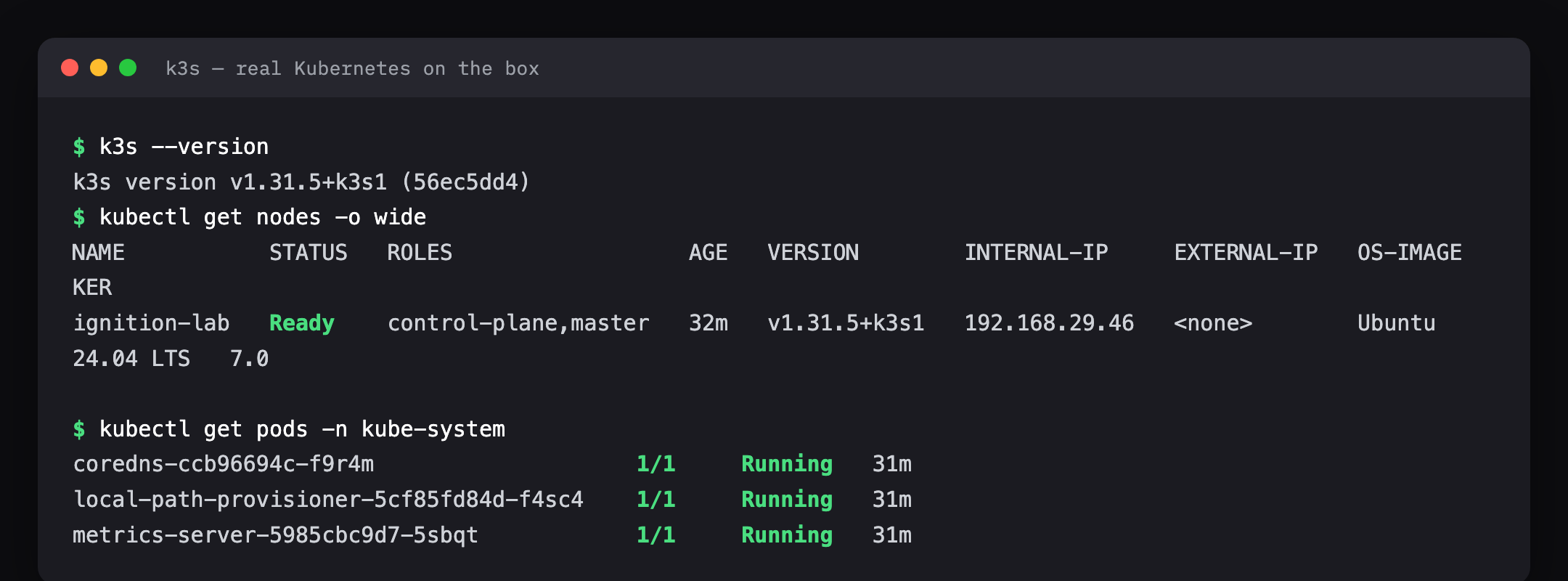
The mental model for what runs where is just four nested boxes: the physical host, a lightweight container on it, Kubernetes inside that, and then the actual workloads — the gateways and their database — as pods. A pod is simply "one or more containers that live and die together." Each one gets its own persistent volume: a slice of disk that outlives the pod, so a gateway's config survives the gateway being destroyed. Hold onto that last point, because it's the difference between self-healing and self-harming.
Standing up Ignition — the whole stack in one file
Everything about this deployment lives in a single text file: two gateways worth of intent, a Postgres database for them to log to, the storage, and the network port to reach them. One command applies it. That file is the entire plant, in a form you can read, review, put in Git, and diff — which is a whole argument I've made before about SCADA and won't repeat here.
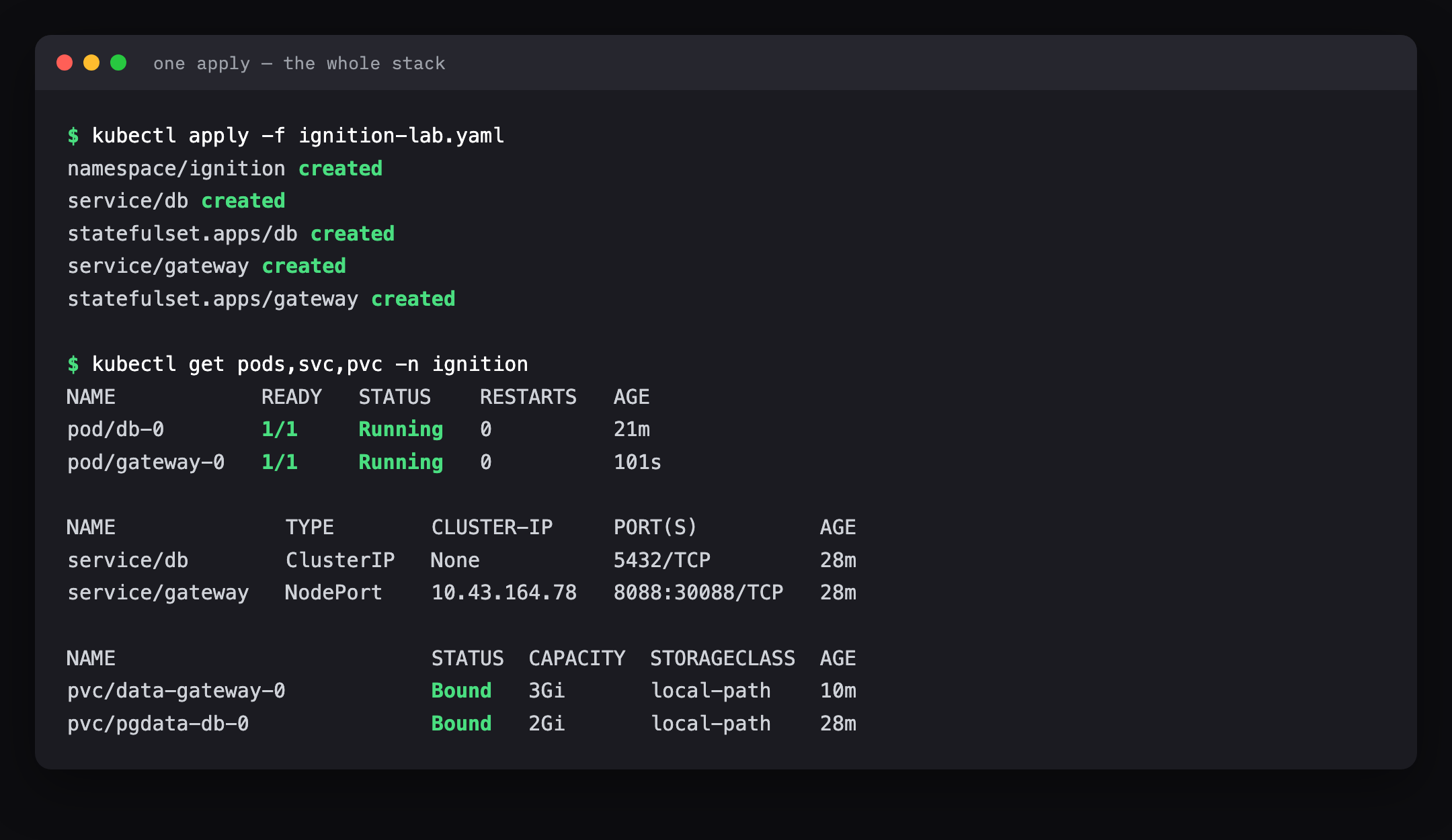
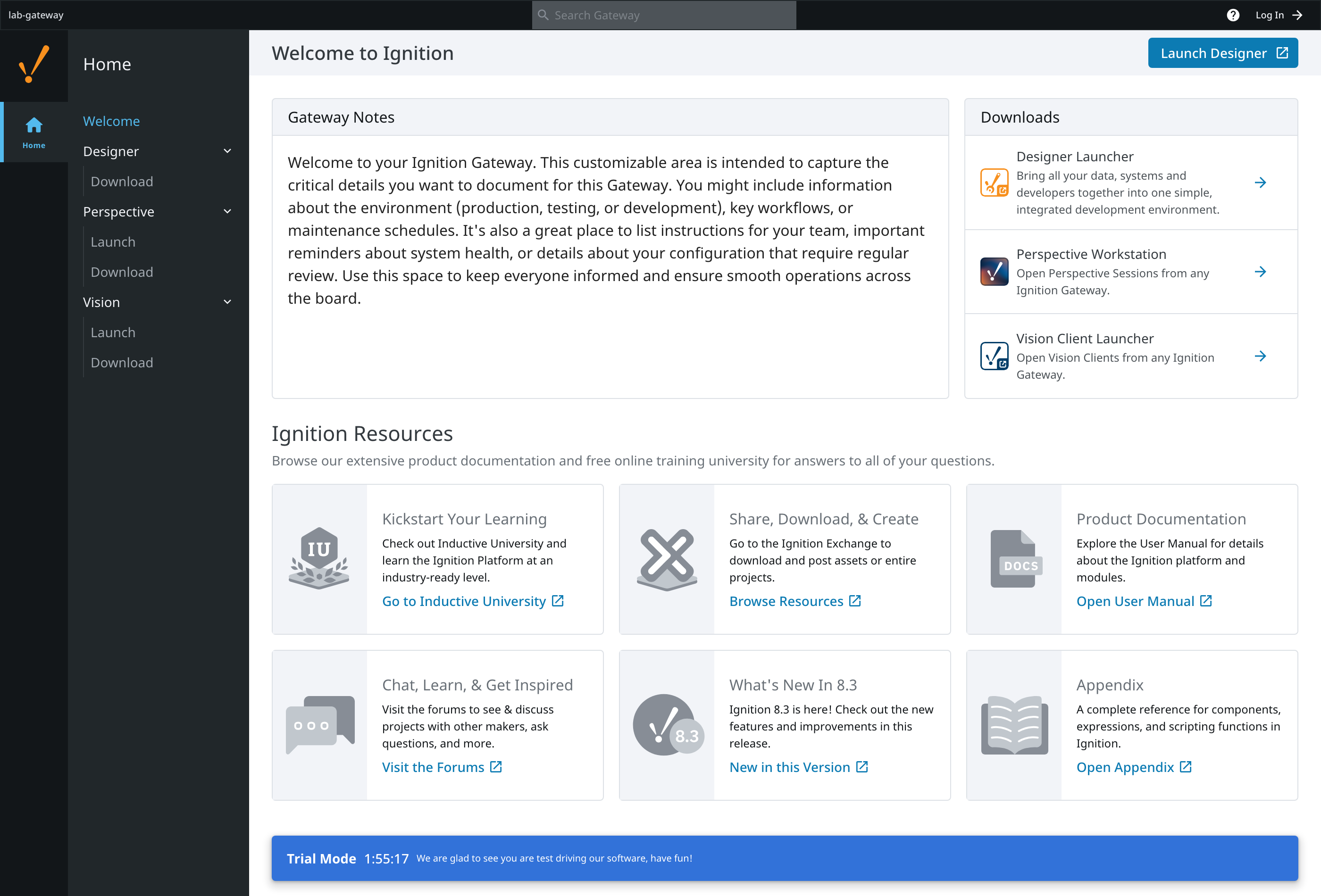
The image is the official one Inductive Automation publishes, so this is real Ignition 8.3, not a lookalike. A minute after the pod went green, the gateway home page answered on the LAN.
What happens when a gateway dies
This is the demo that matters, so I didn't simulate it gently. I deleted the running gateway outright — the Kubernetes equivalent of yanking the server's power cord — and timed the recovery.
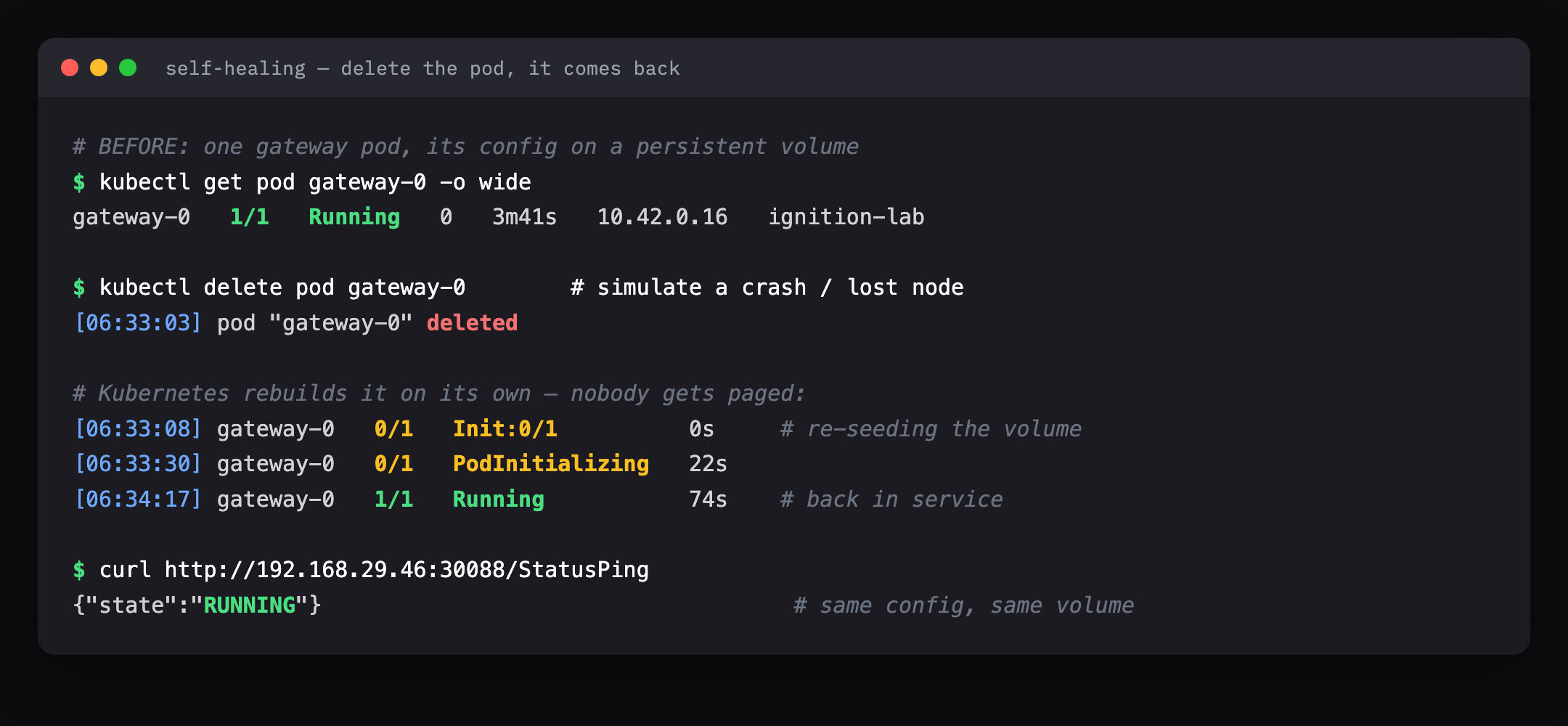
Kubernetes noticed within five seconds and rebuilt the gateway with no human involved. Seventy-four seconds later it was fully commissioned and answering, with the same name and the same configuration, because the config lived on the persistent volume, not inside the pod. That's the whole trick: the pod is disposable, the volume is not.
Now the honest part, because 74 seconds is not nothing. Here's what a SCADA system actually does during that gap. On a single gateway, for those 74 seconds: operator clients show "disconnected," live tag values freeze, historical logging pauses, and — the one that matters — alarms are not being evaluated. For a reporting dashboard, a 74-second blip is invisible. For a running process in the middle of the night, 74 seconds of no alarms is not something you sign off on. Which is the whole reason you never run a single gateway for anything that matters, and the reason the next section exists.
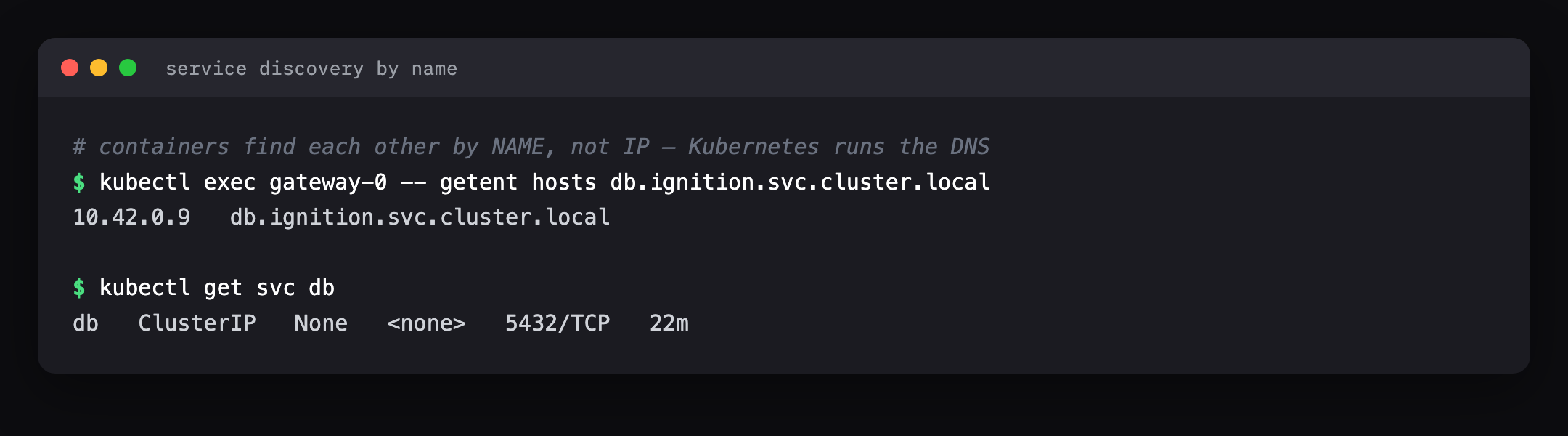
Containers find each other by name
A quick one that OT people underrate. In a normal plant network, moving a
server means chasing hard-coded IP addresses through a dozen config screens.
In the cluster, the gateway reaches the database by the name db, and
Kubernetes runs the phone book. The database can be rebuilt, land on a new
internal IP, and the gateway never notices — the name still resolves.
Upgrading without a clicking marathon
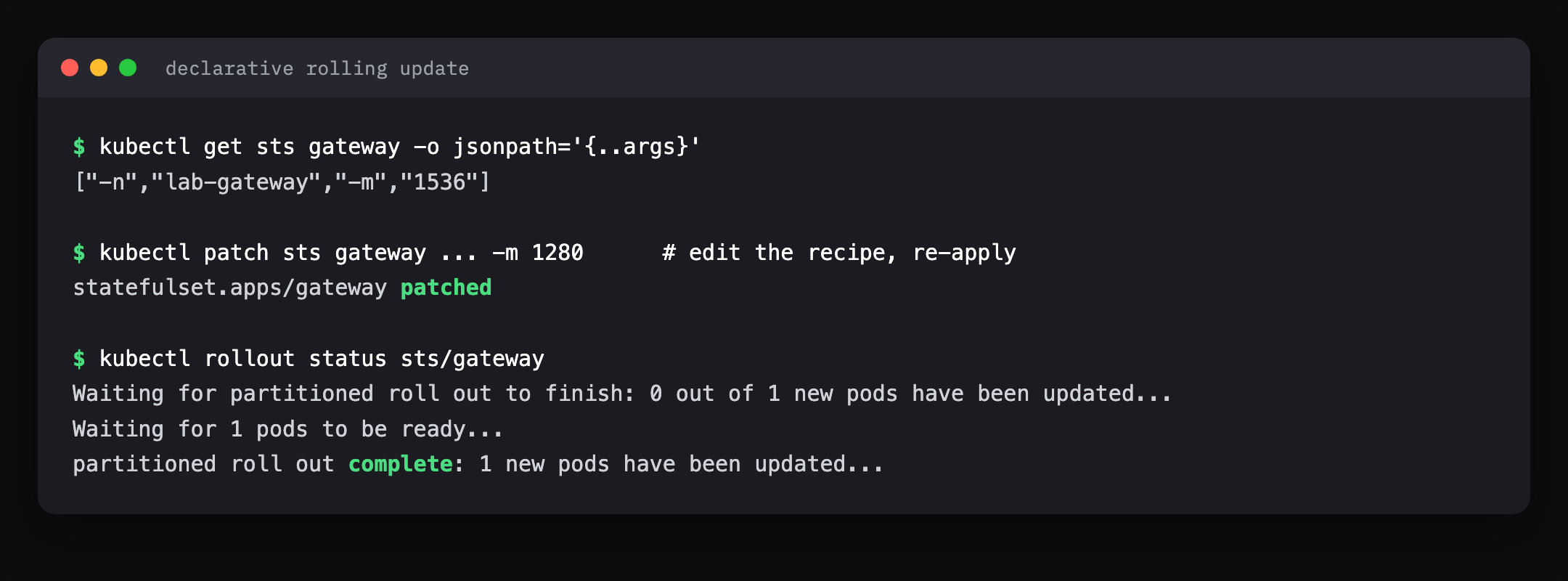
Changing the gateway — here, bumping its memory — is an edit to that same text
file and one command. Kubernetes does a rolling update: it brings the new
version up, checks it's healthy, and only then retires the old one. And if the
change is bad, kubectl rollout undo puts the last-good version back just as
fast. Upgrades and rollbacks stop being a Saturday-night event.
Two gateways, one command
To make the "fleet" idea concrete, I asked for two gateways instead of one. I changed a single number and Kubernetes built a second, fully independent gateway — and, unasked, gave it its own storage.
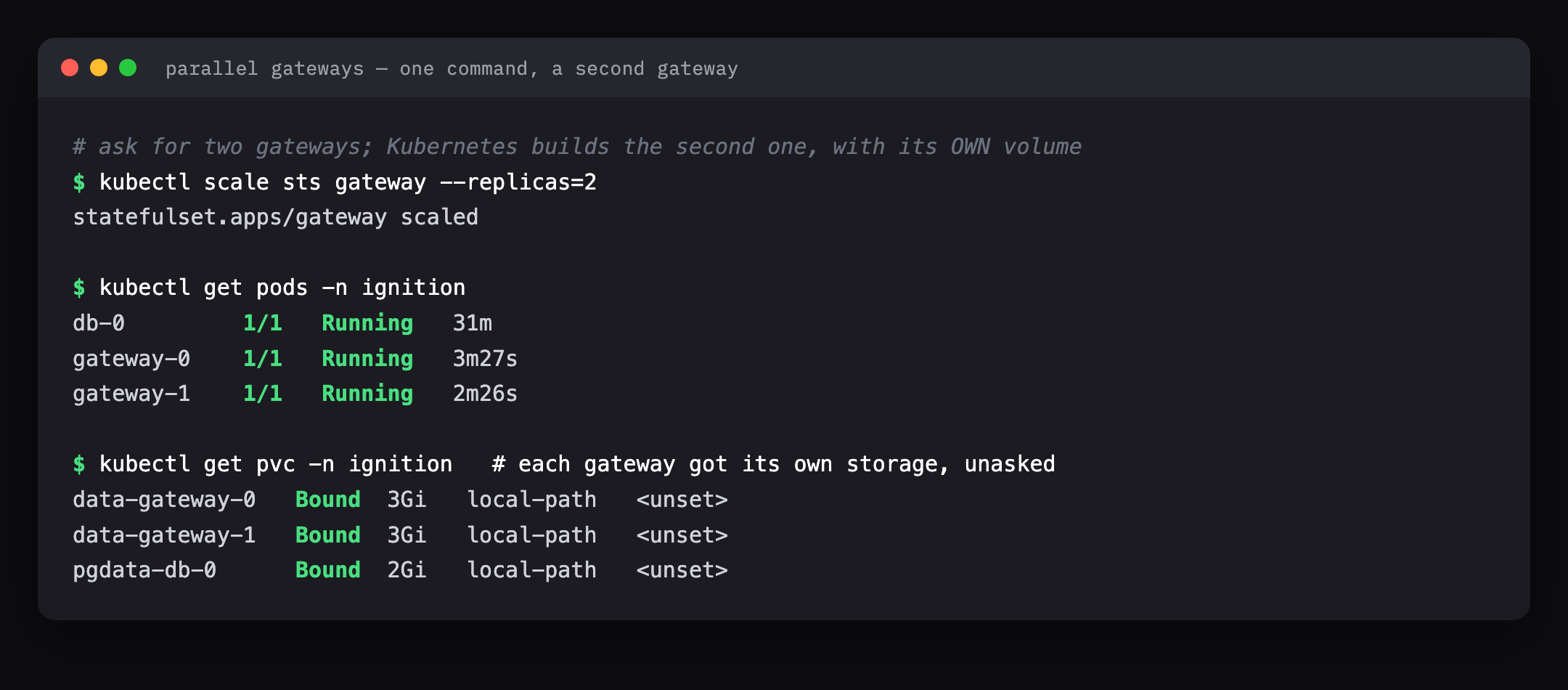
Change that 2 to a 20 and the work is exactly the same. This is how running
five sites and running five hundred stop being different problems.
But a lone gateway still has a gap — so here's a real cluster
Everything above was one gateway healing itself in 74 seconds. For a live process you want the gap to be seconds, and that means a proper Ignition cluster, not a lone pod. This is where Kubernetes stops being a curiosity and starts matching how serious SCADA is actually run.
Three shapes, all of which Kubernetes automates:
- A redundant pair. Two back-end gateways, one active and one hot backup, kept in sync over Ignition's gateway network. When the active dies, the backup is already warm and takes over in seconds — not the 74 it takes to build a new one from scratch. This is Ignition's own redundancy feature; Kubernetes just keeps both halves alive and correctly wired.
- Front-ends behind a load balancer. When you have many operators or many clients, you run several stateless front-end gateways sharing the load, with the redundant pair behind them holding the real state. Scaling for load and scaling for safety become two separate dials.
- A standby in another location. The failure a single site can't survive is the whole site going dark — power, network, fire. So you run a standby gateway in a second building or region, replicating over the gateway network, ready to become primary. Same manifests, a different place to run them.
And the "parallel working environment" question has the cleanest answer of all: because the whole setup is one text file, you stamp out dev, test, and production copies from the same recipe, each fully isolated in its own namespace, each identical to the last. No more "it worked on the test gateway" because the test gateway was hand-built differently.
You do not have to write any of this from scratch. Inductive Automation now
ships an official Ignition Helm chart
(helm repo add inductiveautomation https://charts.ia.io, with docs at
charts.ia.io) that builds standalone gateways, redundant
pairs, and front-ends-behind-a-load-balancer as ready-made building blocks. The
vendor is telling you, in a supported product, that this is a real way to run
Ignition — see their ICC 2025 talk
and the earlier deployment-patterns walkthrough.
The fuller ledger of what a cluster buys you
Self-healing and redundancy are the headline, but they're not the whole account. Here's the rest, in plain terms — and nearly every line is something an OT team already does by hand, inconsistently, and would rather not.
Self-healing
A crashed gateway restarts itself. No 2 a.m. phone call.
Redundancy
Active + backup pair, automatic failover in seconds.
Rolling updates + rollback
Upgrade with one command; undo a bad one just as fast.
Config as text (GitOps)
The whole setup is a file you version, review, and diff.
Fleet at any scale
5 gateways or 500 — managed the exact same way.
Parallel environments
Dev, test and prod from one recipe, fully isolated.
Efficient hardware
Many gateways packed onto shared nodes, with hard limits so one can't starve the rest.
Find-by-name networking
Containers reach each other by name; IPs can change underneath.
Central secrets & certs
Database passwords and TLS handled in one place, not pasted per box.
Backups as code
Scheduled gateway backups run on a timer you declare once.
Runs anywhere
Same files on your own metal, at the edge, or any cloud — no infra lock-in.
Health-aware
Kubernetes only sends traffic to gateways that report healthy.
The through-line: none of these are new capabilities. Your team already patches gateways, keeps spares, copies configs, and takes backups. Kubernetes' contribution is doing all of it the same way every time, from a file you can read, instead of from tribal knowledge in one person's head.
Where it bleeds — because a lab that only works is a brochure
I'm not selling anything, so here's everything that fought me or should give you pause.
- Single-node is not high availability. My whole cluster is one box. If that box dies, everything dies. Real resilience means three or more nodes so the cluster survives losing one — which is more hardware, more network, more to run. The self-healing above protects against a gateway failing, not the machine failing.
- It is genuinely more to learn. Pods, services, volumes, namespaces, probes — that's a real vocabulary, and a plant with no IT staff is signing up to either learn it or pay someone who has. This is the honest cost the benefits have to clear.
- The gotchas are invisible until they aren't. I hit two in one afternoon: the empty-volume seeding trap, and a disk-pressure eviction that killed both pods until I grew the container's disk. Neither is in a getting-started guide.
- Running Kubernetes in a lightweight LXC container needs the guardrails down (a privileged container). Fine for a lab; for production you'd use proper virtual machines or bare metal, and take the security seriously.
- The air-gap question is unresolved here. A lot of OT runs deliberately disconnected. Kubernetes can run fully air-gapped, but pulling the images and keeping them current without internet is real work I didn't test.
None of these are reasons not to do it. They're the reasons to do it deliberately, with the right hardware and someone who has run it before — not because a vendor slide made it look like one click.
The verdict
For a single small plant with one gateway and one person who knows it, Kubernetes is overkill, and anyone who tells you otherwise is selling something. The learning curve alone won't pay for itself.
But the moment you run many gateways — several sites, a central SCADA service, an integrator standing up the same stack for client after client — the maths flips hard. Everything a good OT team already sweats over by hand (keeping a hot spare, failing over cleanly, upgrading without drama, copying a known-good config to the next site, taking backups on a schedule) is precisely what this tool does automatically and identically every time. The 74-second self-heal, the two gateways from one number, the whole plant in a file you can review — those aren't cloud-native party tricks. They're the standby-server discipline OT has always wanted and mostly faked.
That's the real finding. Kubernetes didn't bring anything new to the plant floor. It brought a way to stop doing the old things by hand. And for a control room, "the same way, every time, without a human at 2 a.m." has always been the whole point.
This cluster has since become the bench for everything else I wanted to measure. It's where I generated ten site gateways from one repository, and where I scaled fifteen hundred Sparkplug edge nodes at a single gateway to find out what a fleet does to it. It is also the OPC UA source I pointed HighByte's DataOps layer at, so that lab had genuinely moving process data rather than a file. Being able to throw that much at a control system and then delete it is most of the value.
Newsletter
New essays, by email.
SCADA, cloud, AI, and the plant floor — a short email when something new is published. No noise, unsubscribe anytime.