Concluded·27 Jul 2026 · 15 min read
N3uron, edge to central: SCADA plumbing that snaps together like a DIN rail
N3uron 1.22 · Ignition 8.3 · OPC UA · Docker · MCP
Every plant I've walked through has the same missing layer. The PLCs are fine. The SCADA is fine. But the moment somebody outside the control room wants the data — a reliability engineer with a spreadsheet, a head office dashboard, an ERP system, and now, inevitably, an AI assistant — the answer is a mess of CSV exports, a fragile OPC tunnel through the firewall, or a custom script that one person understands and nobody dares touch.
N3uron is a product built for exactly that layer, and its pitch is architectural rather than feature-based: one small runtime, everything else a snap-on module, every node the same software whether it sits next to the PLC or in head office. I wanted to know whether the architecture holds up when you actually run it, so I built the whole story in my home lab in one evening: a real Ignition gateway standing in for the plant, an N3uron edge node reading it over OPC UA, a TLS link carrying everything to an N3uron central node, a historian, a REST API, and — the part that got me to run this lab in the first place — a native MCP server, which is the new standard plug for AI assistants. Then I tested how far each piece really goes.
This write-up assumes you know your way around a plant network and does not assume you care about Docker. Wherever the IT machinery matters, I'll say it in panel-shop terms.
The idea worth stealing: a software DIN rail
Most SCADA packages are monoliths. One big install, one process, everything — drivers, historian, alarming, web server — living inside it. When one part misbehaves, you restart the whole thing, and the whole plant view blinks.
N3uron is built the way you'd wire a panel. There's a core, which is a small supervisor that does almost nothing: it starts modules, watches them, and owns the tag model — the shared namespace every module reads from and writes to, like a backplane. Everything else is a module running as its own operating-system process: the OPC UA client is a process, the historian is a process, the REST server is a process. Snap on what you need, leave the rest off the rail.
ONE N3URON NODE
CORE · a thin supervisor. Starts modules, restarts them if they die, owns the tag model. That's all it does.
TAG MODEL — the backplane every module plugs into
OPC UA CLIENT
talks to the PLC / SCADA side
own OS process
HISTORIAN
stores tag history
own OS process
REST API
serves data to IT
own OS process
MCP SERVER
serves data to AI clients
own OS process
MODBUS · S7 · DNP3 …
40-odd more, snap on when needed
own OS process
every module is a separate process wired to the backplane — kill one and the rest keep running · all config is JSON files on disk
Two consequences of that shape did real work during this lab, so they're worth naming before the build:
- Blast radius. I crashed modules repeatedly (you'll see how). A crashing module takes itself out; the node, the other modules, and the data flowing through them carry on. The core restarts the dead process on a timer. Restarting a module after a config change takes seconds and touches nothing else.
- The config is files. Every module's configuration — the whole node, in fact — is a set of JSON files on disk. The web UI is just an editor for them. At one point I enabled history on twenty tags with a one-line text substitution and a restart, no clicking. That also means the entire node can live in version control, which is the property that made file-based Ignition 8.3 such a big deal. Here it's the default, not the headline.
And the part that makes "edge to central" honest: there is no separate edge product and server product. Both of my nodes below run the same software with different modules snapped on. An edge node is an N3uron with drivers; a central node is an N3uron with a historian and APIs. Scaling out means stamping more of the same thing.
For orientation: N3uron comes out of the same product generation as Ignition and competes most directly with things like Kepware-plus-scripting or a DIY Node-RED data layer. It's free to download and evaluate (everything in this lab ran unlicensed in evaluation mode); production licensing is perpetual, per node, module-priced — roughly €800 a node for local-tags setups at the time of writing, more when a node needs to process other nodes' tags. No per-tag counting anywhere, which after a decade of per-tag SCADA pricing reads like a typo. It is not an HMI: there's a web visualization module, but you would not run your operator screens on it, and it isn't pretending otherwise.
The lab: a plant, a site node, and a head office
I already run a real Ignition 8.3 gateway in this rack from
the Kubernetes lab, so it plays the plant: I
gave it a simulator PLC (Ignition's built-in device simulator, sine waves and
realistic process noise) and switched its OPC UA server on for outside
clients. That's the south side. The two N3uron nodes run as containers on
another box: N3Edge, which sits "at the site" and reads the plant, and
N3Central, which sits "in head office" and never talks to the PLC side at
all.
Total software cost: zero. Total install time for both N3uron nodes: about a minute each — the container image is some 700 MB and the node starts in seconds. The interesting time went into the wiring, which is the actual subject of this lab.
Test one: how fast can you find your tags?
Tag discovery is where data platforms usually lose me. If connecting a source means hand-typing addresses out of a PLC program printout, the tool has already failed, because a real site has ten thousand tags and you have a Tuesday.
N3uron's OPC UA client has a browser panel: point it at the server, and it
shows the live address space as a tree. I browsed straight into the Ignition
gateway, opened the simulator device, and then did the thing that decides
this test — dragged a whole folder from the browser onto the node's tag
model. Ten tags appeared, correctly typed, each wired to its OPC UA node
address, in about five seconds. The module log printed a tidy
Variable created OK per tag as they landed.
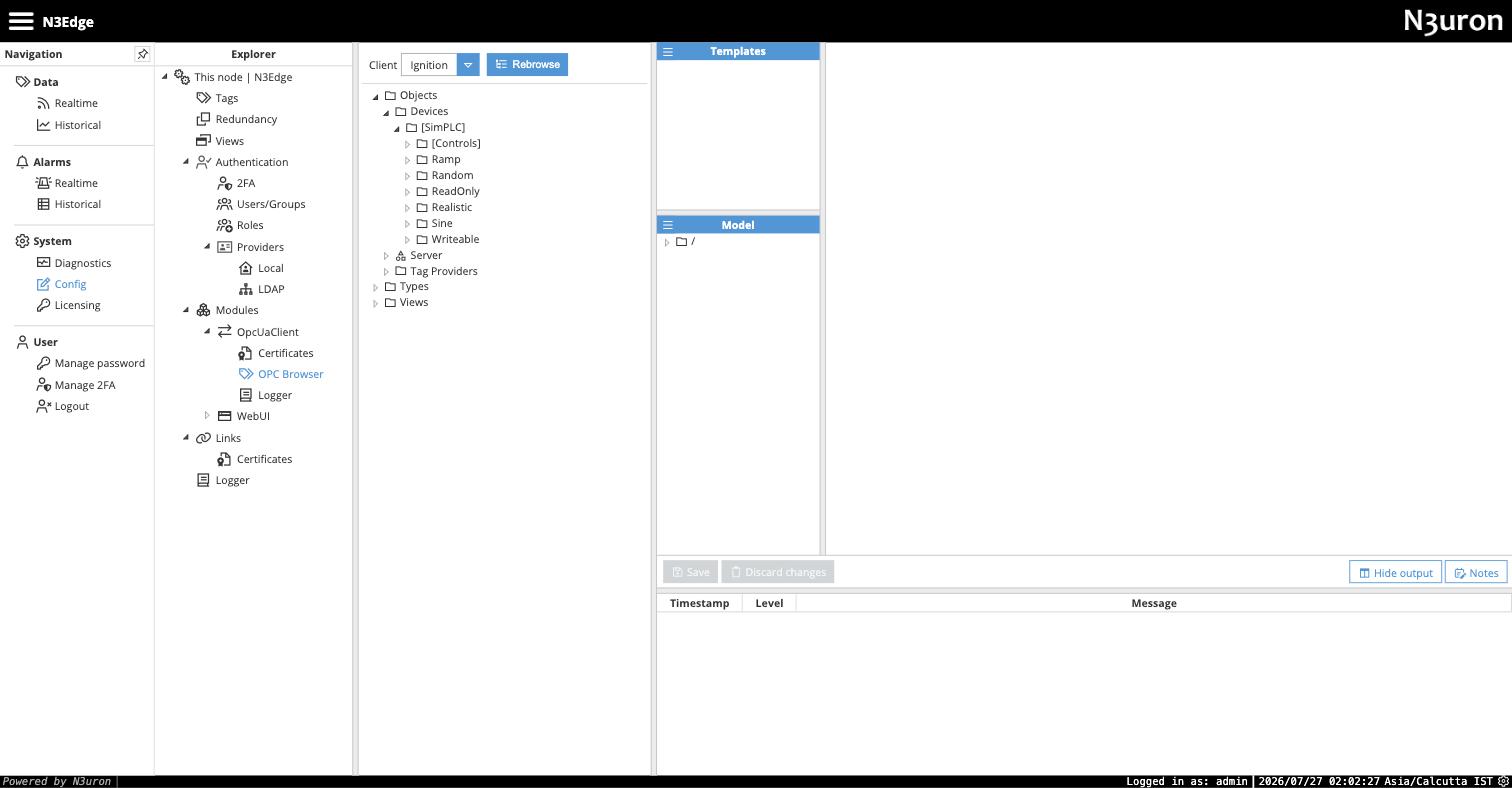
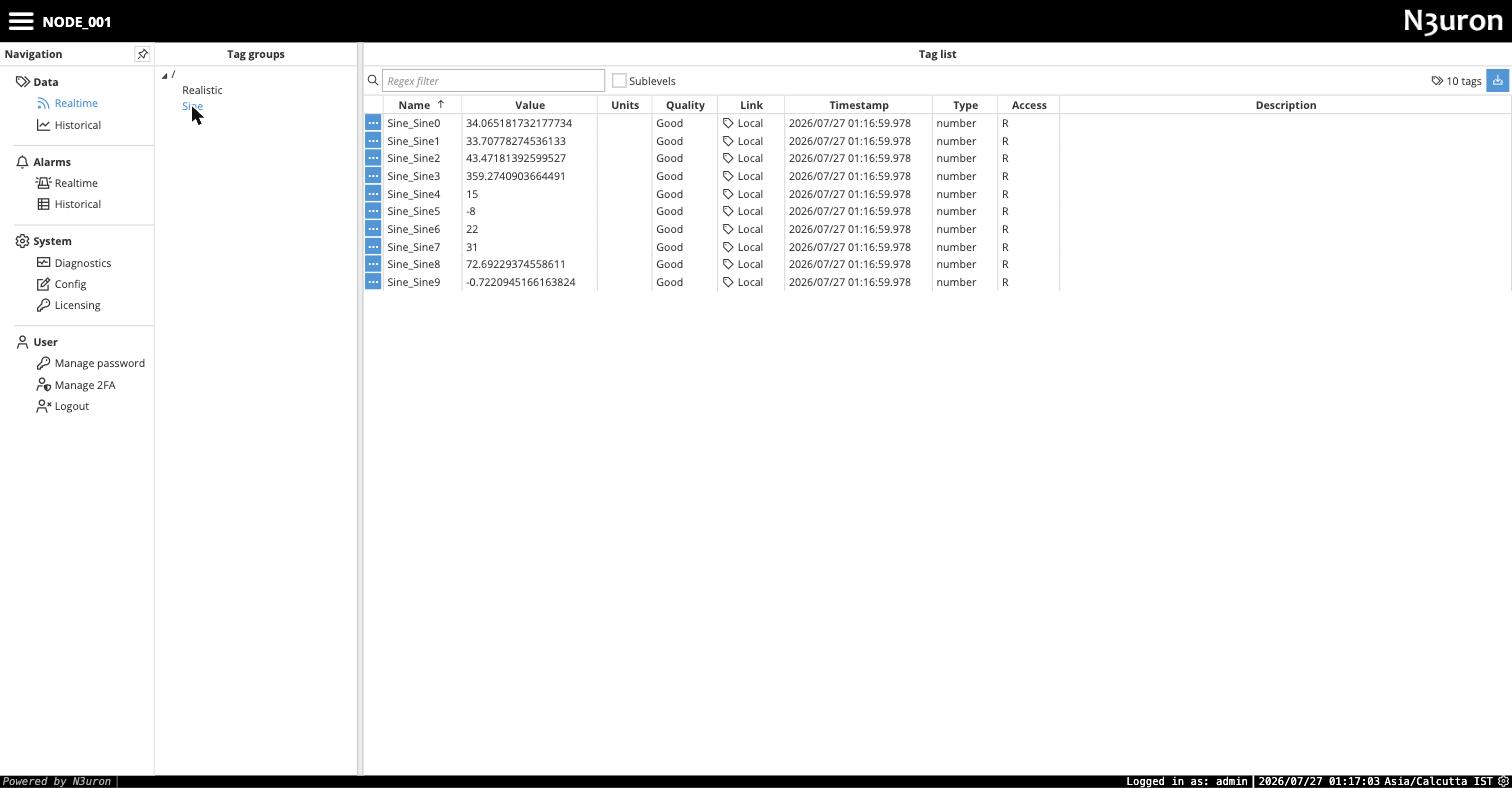
Verdict on discovery: genuinely the best thirty seconds of the product. This is the difference between "we'll integrate the compressor skid next quarter" and doing it before lunch.
Test two: the link — this is the part monoliths can't do
Getting site data to head office is where OT architectures usually get ugly: an OPC tunnel through the firewall, a VPN with DCOM nightmares behind it, or a historian-to-historian replication license that costs more than the sensors. N3uron's answer is the Link — a native, outbound-only connection from the site node to the central node, and it's the piece that makes the whole decoupled design pay off.
The properties that matter, in plant terms:
- The site dials out. The edge opens one outbound TCP connection to the central node. Nothing inbound gets opened toward the plant — the kind of firewall rule your IT team will actually sign.
- Mutual certificate pinning over TLS 1.3. On first contact each node presents a certificate and the other side holds it in a pending list until a human trusts it — both directions, like exchanging keys to the substation. Until both sides approve, no data moves.
- Store and forward is on by default. If the link drops — cellular site, flaky VSAT, backhoe through the fibre — the edge buffers locally (up to sixty days by default, both size and age tunable) and replays when the link returns. Head office gets a complete record with a gap marked, not a gap invented.
- You publish a model, not a tag list. I set the edge to publish its full model; the central subscribed to everything. New tags added at the edge just appear at central. There is no second mapping to maintain, which is where these architectures usually rot.
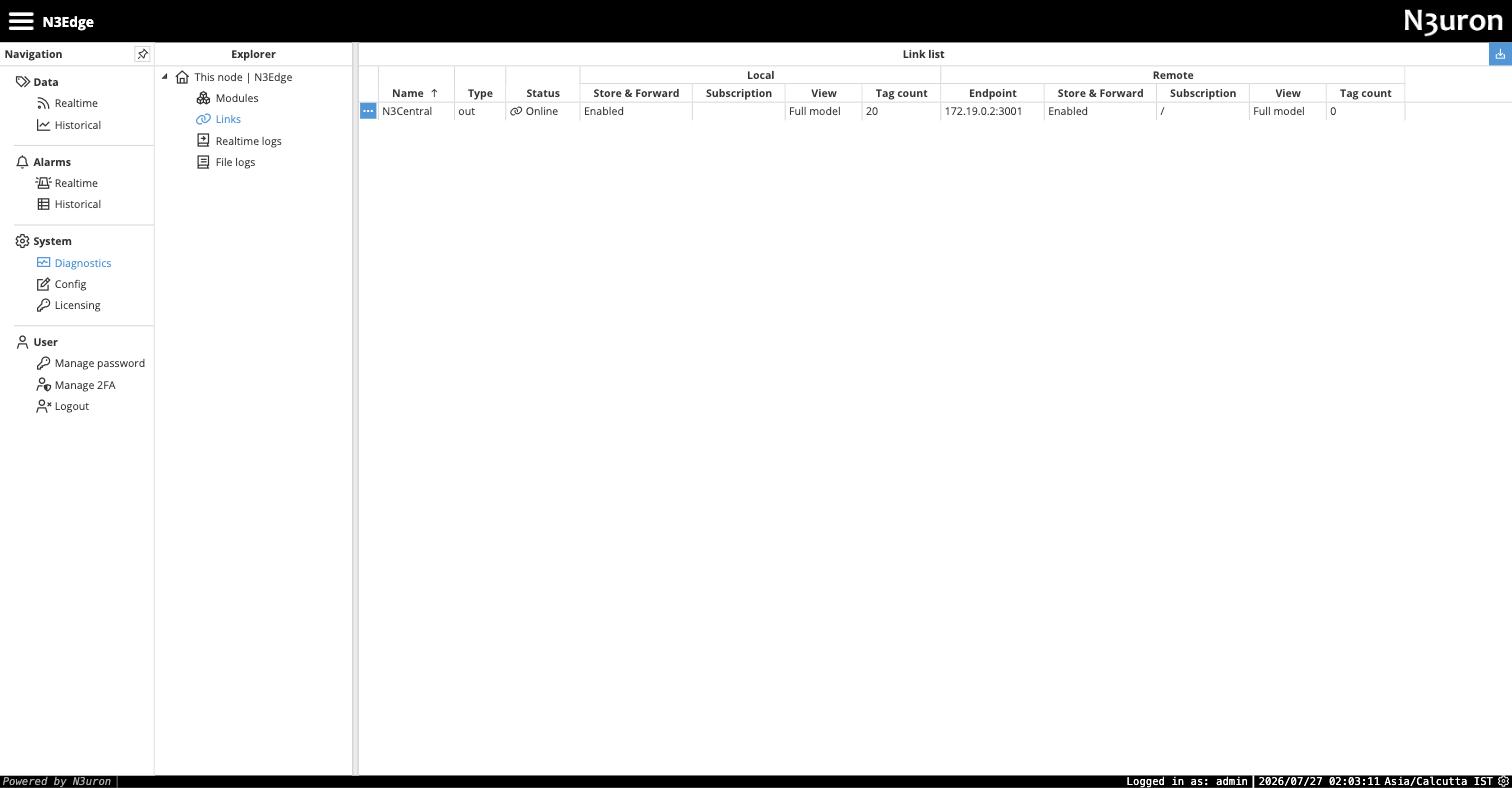
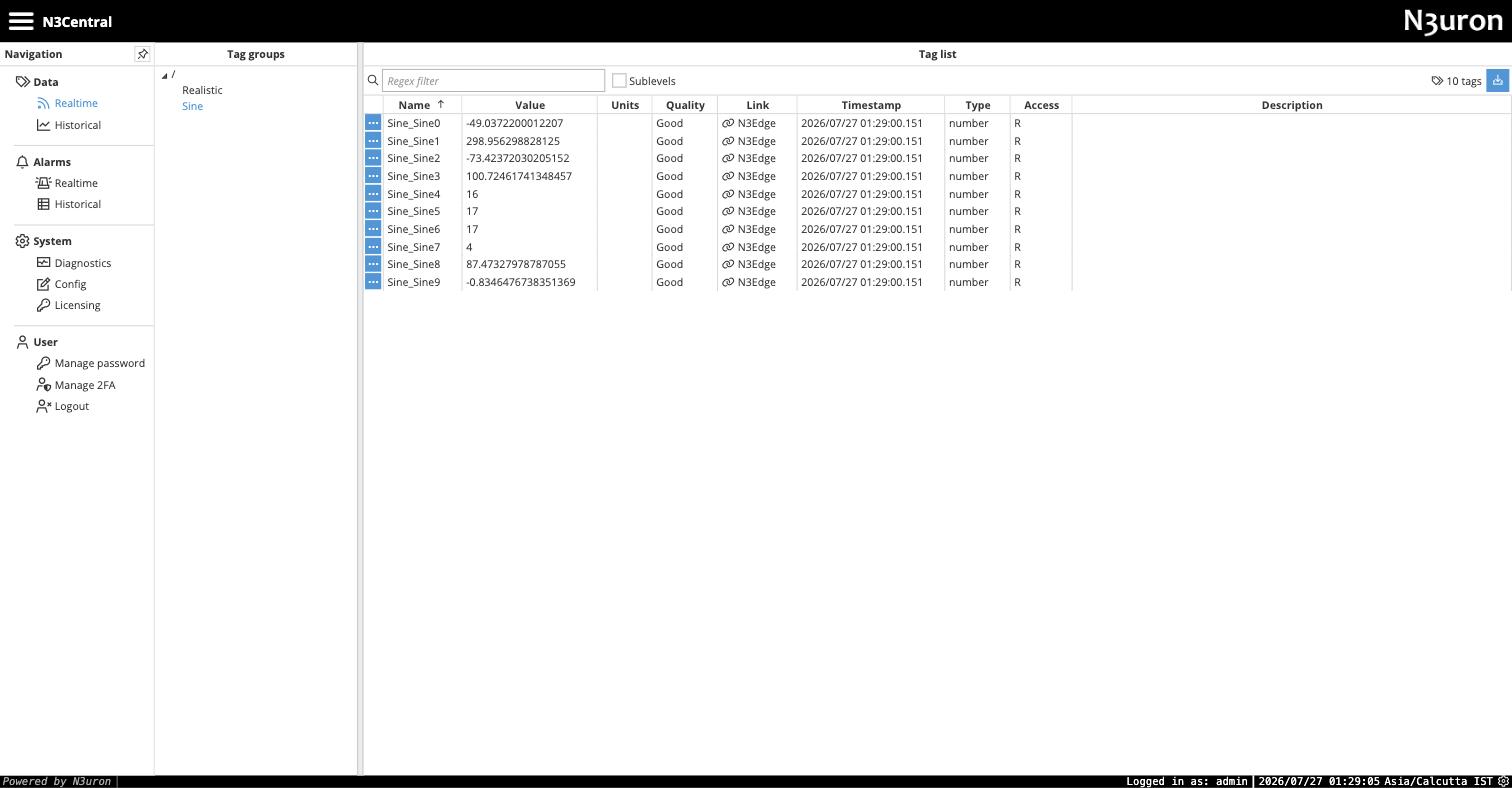
That last caption is the architecture in one line. The central node has no
driver for the plant, no route to the PLC network, no OPC UA anything. It
knows one thing: a node called N3Edge it has exchanged certificates with.
Sever the plant, and head office degrades gracefully; compromise head office,
and there is no inbound path to the plant to ride back down.
Test three: history — stored at head office, not at the site
The pattern I wanted is the one real estates use: sites stay lean, history
accumulates centrally. N3uron does this with one elegant (and one slightly
buried) idea. History is configured per tag, and the tag says which
historian module archives me — including a historian on another node, written
as NodeName/ModuleName. So my edge tags carry the setting
N3Central/Historian: the tag lives at the site, its history lives at head
office, and the link in between is the transport, store-and-forward included.
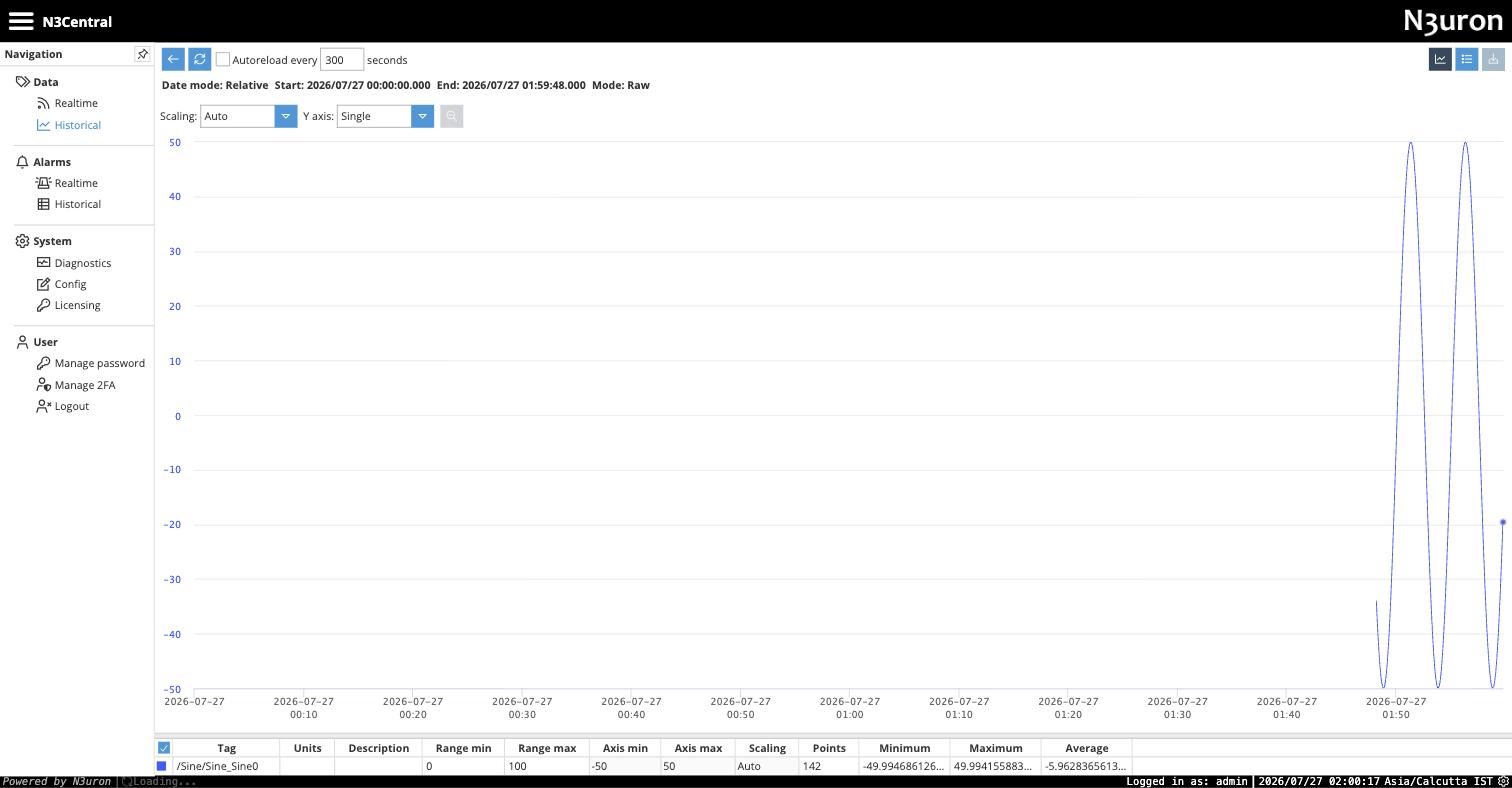
Two honest details from this test. First, when I restarted the edge node
mid-collection, the historian recorded the gap as a bad-quality marker
(quality 32) rather than papering over it — the record admits what it doesn't
know, which is precisely what you want when someone later asks why the batch
report has a hole. Second, the buried part: I first configured the tags with
just Historian (no node prefix), and queries came back empty with an
Unknown module error — because a bare name means a historian on the tag's
own node, and my edge doesn't run one. The node-qualified name is in the
docs, but the failure mode is quiet. That one cost me twenty minutes and is
exactly the kind of thing this write-up exists to save you.
The historian itself ships embedded (it ran inside the container with zero setup) and scales up to TimescaleDB or MongoDB underneath when a real estate needs it — same module, different storage engine.
Test four: getting data out — REST first
A data layer earns its keep on the way out. The REST API Server module took about three minutes: snap on, set a port, generate a bearer token that is scoped — per token — to which API areas and which branches of the tag tree it may see, and whether it may read or write. Then, from my laptop:
# live value
curl -H "Authorization: Bearer $TOKEN" \
  "http://central:4004/tag?cmd=read&path=/Sine/Sine_Sine0"
# → {"value": 18.06, "quality": 192, "ts": 1785096923408}

# raw history, last ten minutes
curl -H "Authorization: Bearer $TOKEN" \
  "http://central:4004/tag?cmd=history&path=/Sine/Sine_Sine0&start=...&end=...&mode=raw"
# → [[ts, -27.39, 192], [ts, null, 32], [ts, -33.98, 192], ...]
Live values with OPC-style quality codes, raw or aggregated history, tag
metadata — everything the reporting side of the house ever asks the control
room for, over plain HTTPS, with a token you can revoke. Note the
[ts, null, 32] in the real response above: that's the edge-restart gap
again, carried honestly all the way out to the API consumer.
Test five: the MCP server — an AI reads the plant, properly
This is the module that made me run the lab, because it's the first time I've seen an industrial vendor ship this natively rather than leave it to a system integrator's weekend script.
If MCP is new to you: Model Context Protocol is the emerging standard for how AI assistants (Claude, ChatGPT, and the agent tools built on them) connect to external systems — a standard socket, so the AI side and the data side don't need custom glue for every pairing. Think of it as OPC UA's job, but for AI clients instead of SCADA clients: discovery, typed reads, permissioned writes, over one well-defined protocol.
N3uron's MCP Server is just another module on the rail. Same pattern as REST: port, bearer token, and — this is the part I'd show your security team — a per-token permission sheet: which tool categories the token may use (tags, logs, modules, system), read versus read/write, and which branches of the tag tree it can see at all. I cut a token, pointed an AI client session at the endpoint, and probed how deep it goes.
1. BROWSE
“what's here?” → groups /Sine, /Realistic
2. DESCRIBE
tag metadata plus live values and quality
3. HISTORY
raw samples from the historian, with gaps marked
4. WRITE
refused — “Tag is read-only”
one AI client session against the MCP module — discovery, live data, history, and a write correctly stopped by the token's permissions
What the client actually got, in order: the full tag tree by browsing; tag
metadata with live values and quality; raw history straight out of the
central historian (gap marker included); regex search across the namespace;
node health — CPU per core, memory, module states — and the module log files
as readable resources. Sixteen tools in all. And when I had it attempt a
write to a read-only tag, the module refused with a clean
Tag is read-only — the permission model held at every layer I pushed on.
Step back and look at what that chain means: a question typed into an AI assistant can now be answered from live, permissioned, quality-stamped plant data — the assistant browses the namespace like an operator browsing a tag tree, pulls history like a reliability engineer, and cites values with quality codes — without anyone building a custom integration, and without the AI holding anything more powerful than a revocable token you scoped yourself.
The obvious warning, stated plainly: that same protocol supports writes, and the module will happily expose them if you grant a token read/write on tag paths. An AI with write access to live process tags is not a feature, it's an incident report with a timestamp in the future. Cut read-only tokens, scope them to the branches the assistant needs, and treat the token sheet with the same seriousness as a firewall rule. The product gives you exactly the knobs to do this right; use them.
Where it bleeds — because a lab that only works is a brochure
Everything that fought me, so you can budget for it:
- Fresh modules crash-loop until you save their config sections. A newly
added REST or MCP module dies on start looking for config files that don't
exist yet (
access,tools, and friends) — files that only get created when you open each section in the UI and hit save, even empty. The supervisor dutifully restarts the module every five seconds forever. Ugly first impression; two minutes to fix once you read the module's log. - The link-name-equals-node-name rule, described above. Documented, quiet, load-bearing.
- Node-qualified historian names, described above. Same category.
- The OPC UA advertised-endpoint dance — not N3uron's sin, but it's in the path and the error is generic.
- Small API quirks. The REST history endpoint ignored my aggregation parameters on a GET and returned delta mode; the MCP history tool wants ISO date strings where the REST one takes epoch milliseconds. Cosmetic, but the kind of thing that eats an afternoon in a real integration.
- Trial-mode friction in the lab feed: my Ignition source pauses every two hours un-licensed, which is Ignition's policy, not N3uron's — but if you reproduce this lab, that's the timer you'll trip over.
- I did not test scale. Twenty tags is architecture-testing, not load-testing. N3uron's own references run into the hundreds of thousands of tags, but nothing here validates that.
The verdict
Judge N3uron as what it is — the data backbone between the plant and everything above it — and the architecture genuinely delivers. Every claim in the brochure diagram survived contact: modules failed without taking the node, the whole config lived in version-controllable files, the site dialed out through one approved hole in the firewall with certificates both sides had to trust, history flowed to head office and marked its gaps honestly, and the same install worked as edge and central with nothing but different modules snapped on. The worst I can say is that its sharp edges are quiet ones: a handful of naming rules and empty-config traps that cost twenty minutes each precisely because everything around them works so smoothly.
The MCP server is the finding, though. Every industrial vendor is currently bolting "AI" onto slide decks; this is the first time I've run one that shipped the actual plumbing — discovery, live reads, history, quality codes, and a permission model a security reviewer can reason about — speaking the same protocol the AI tools themselves are standardizing on. The gap between "our data is in the historian somewhere" and "the assistant answered from live plant data and cited quality codes" turned out to be one evening and zero custom code.
Worth saying which way this one points, because the next MCP server I ran did the opposite. HighByte's exposes tools that let an AI build pipelines, and exposes almost none of the plant itself. N3uron's is a read surface for asking questions; that one is a write surface for building plumbing. Same protocol, opposite purpose.
The monolith SCADA isn't going anywhere, and it shouldn't — it runs the screens and the alarms and the operators' Tuesday. But the layer above it, the one every plant improvises with CSV exports and one irreplaceable script — that layer now has a product-shaped answer that's built the way OT already thinks: small pieces, isolated failures, explicit trust, and everything on the rail replaceable without touching the rest. That's not a cloud idea visiting the plant floor. That's panel-building discipline, finally applied to data.
Newsletter
New essays, by email.
SCADA, cloud, AI, and the plant floor — a short email when something new is published. No noise, unsubscribe anytime.